Plutonium Anticheat Setup and Breakdown
Plutonium is a client that provides security patches for exploits in the vanilla game, but have also implemented many anticheat features for competitive play on World at War, Black Ops, and Black Ops II.
It is important to follow this guide, as it is required for all runs on Plutonium, and also because some of the anticheat features are not on by default, as Plutonium was designed for mostly casual players.
Using the latest version of one of the following community patches will automatically do most, if not all, of this setup for you:
Enabling the Anticheat
Enabling the anticheat features is easy, you will only have to do this once as it will save to your config. To enable the anticheat features, you must open the in-game console. You can find a guide on how to do that here.
Once the console is open, you will want to copy and paste in the following text by selecting it, then pressing Control + V in-game with the console open:
cg_flashScriptHashes 1; cg_drawIdentifier 1
What did that command do?
The command will have enabled two things:
- Hashes Flash
- Game Identifier
What do these features do?
Hashes Flash
This enables the flashing of extremely important information on your screen at the beginning of every record attempt to ensure that a game is played legitimately. Said information will be displayed in the following order:
- Game File Hashes, will show what scripts and Fastfiles are new/modified in comparison to vanilla's.
- Plutonium will by default include files such as zm_spawn_fix.gsc, callbacks.gsc or ranked.gsc for certain fixes related to rejoining on coop games and further anticheat functionality, do not be alarmed by these files being there, they are necessary.

- Plugin Hashes, important for detecting modified plugin files, will only appear if you use one, such as Competitive-T5.

- Plutonium & Vanilla Code Hashes, important for detecting the use of injectors, Cheat Engine, etc.

Game Identifier
This prevents splicing, it is a constantly drawing string of information on the top right of the screen, it will scale with your resolution to ensure it is readable.
- Said information is the following, listed in order as it's seen on the screen, from left to right:
- Current Unix time
- Randomly generated value on game-process-start
- Randomly generated value on map-load
- Random Unique ID, generated every map-load/restart
- Plutonium version
- User ID
- Map-load Unix time

On Plutonium versions r5202+, the identifier will contain the following information:
- Current Graphic Content value
- Current Campaign Difficulty value

For the Graphic Content value, 0 means Reduced, and 1 means Unrestricted.
For the Campaign Difficulty value:
- 0 is Recruit
- 1 is Regular
- 2 is Hardened
- 3 is Veteran
Cheat State
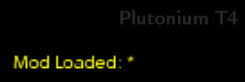
By default, while paused or showing the scoreboard, Plutonium will display an asterisk symbol (Mod Loaded: *) on the top right of the screen when cheats have been enabled at all in the current game, or some other deep way of cheating has been detected in the current game.
The asterisk at the end is important, even for custom maps, as that is the cheat indicator.
Recommendations
It is highly recommended to do the following at the end of the game:
- Run the command flashScriptHashes 1, that will show if anything has been modified in your game at all.
- Show the scoreboard or pause at least once, this will show if the cheat state has been activated.
Submit Edit
Do you have a ZWR profile?
Contributors
Original Contributor(s)
Other Contributors
No other contributors yet.